Delhi Nurses Online Registration & Verification System : delhinursingcouncil.in
Organisation : Delhi Nursing Council
Facility Name : Nurses Online Registration & Verification System
State : Delhi
Website : https://delhinursingcouncil.in/DNC
| Want to ask a question / comment on this post? Go to bottom of this page. |
|---|
What is Delhi Nurses Online Registration & Verification System?
The Delhi Nurses Online Registration & Verification System is managed by the Delhi Nursing Council (DNC) and operates through their official website, delhinursingcouncil.in. To use the system, new users create an account by providing a valid email and mobile number for OTP verification. Registered users can then log in to apply for new registrations or renewal, and the system also allows for online verification of registration status by entering the DNC registration number and date of birth.
Related / Similar Facility : Delhi Nursing Council NOC For Registration With Other State Nursing Councils
How To Login To Delhi Nurses Online Registration & Verification System?
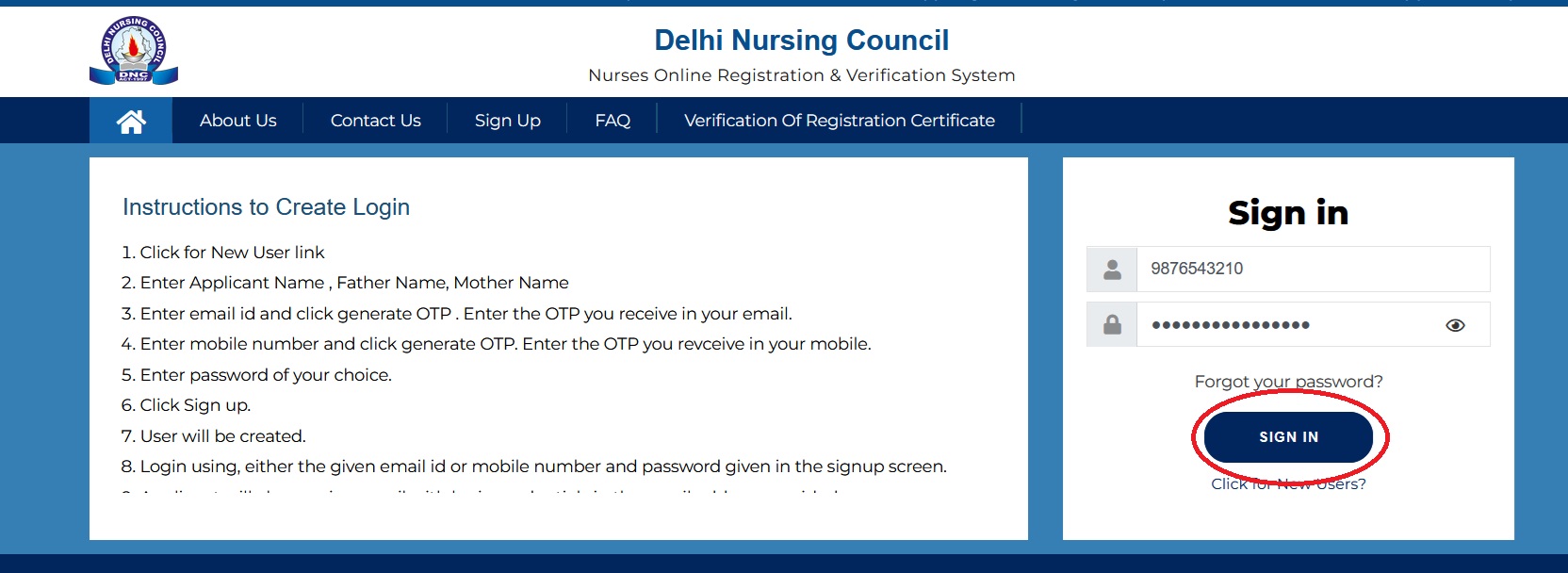
To login to Delhi Nurses Online Registration & Verification System, Follow the below steps
Steps:
** Click for New User link
** Enter Applicant Name , Father Name, Mother Name
** Enter email id and click generate OTP . Enter the OTP you receive in your email.
** Enter mobile number and click generate OTP. Enter the OTP you revceive in your mobile.
** Enter password of your choice.
** Click Sign up.
** User will be created.
** Login using, either the given email id or mobile number and password given in the signup screen.
** Applicant will also receive a mail with login credentials in the email address provided.
FAQ On Delhi Nurses Online Registration & Verification System
Frequently Asked Questions FAQ On Delhi Nurses Online Registration & Verification System
1) What should I do if I entered data by mistake in Primary Registration instead of Re Registration?
You have to mail a request to support@delhinursingcouncil.in mentioning your registered Emil address and Mobile number to clear the Primary Data. Once your data in Primary Registration is cleared you can do Re Registration.
2) What will happen if I upload Photostat copies instead of Original Documents?
Verifier will put your physical verification of documents on hold status if you upload Photostat copies instead of Scan copy of Original Documents.
3) What should I do if my Physical verification status is put on hold?
You have to re upload Original documents and take re appointment. You can upload documents same day. But Option to take Re Appointment will be activated only next day of your Physical verification. No need to pay payment again.
For example if your original appointment for verification was held on 12th Feb, and verifier put your application on hold (due to incorrect information / photocopies uploaded/ not prescribed documents uploaded/ no original document / not properly attested form ) you can re upload documents same day but option to take next date and time slot will be activated on 13th Feb only.
4) What should I do if I couldn’t attend Physical Verification on chosen date and time?
You can take new Date and time next day to your first appointment. For example if you couldn’t attend verification scheduled on 12th Feb, you can again took new appointment on 13th Feb. You will get a slot from Feb 14th onwards according to the availability.
5) Is it possible for me to book a new slot same day, if I failed to turn up for appointment?
No. Next day only you will get option to take new date time slot.
6) Do I have to pay fees again to take re appointment?
No. Next day onwards you can again schedule your appointment. No need to pay fees again
7) What are the common causes for rejection at verification?
** Photo not in white background
** Photo mismatch in attested form and uploaded photo
** Uploaded Photostat copy of documents instead of original copy
** Not uploading prescribed documented as mentioned
** In correct information’s with no supporting documents as proof