STS Karnataka Special Case Permission For New School Registration
Organisation : Shikshana Kirana (STS Karnataka)
Facility Name : Special Case Permission For New School Registration
Applicable State : Karnataka
Website : https://sts.karnataka.gov.in/SATSNEWSCHOOL/schoolreg/adminwelcome.htm
| Want to ask a question / comment on this post? Go to bottom of this page. |
|---|
How To Get Special Case Permission For New School in Karnataka?
1.In the event that the management receives permission from a higher authority such as the High Court, Government, CPI, or ACPI. In the CPI login, an option to enable the application based on these manual orders. This feature is available in the CPI login, where the CPI can activate the application and specify the academic year for which the school should be enabled, as per the orders.
Related / Similar Facility : STS Karnataka New School Appeal

2. After enabling the application, the concerned DDPI/ACPI should access the ‘Special Case Enclosure’ menu, where the particular application will be available for processing. The DDPI/ACPI should then review the application details, update the necessary documents by uploading them to the application, and submit it as per the provided instructions.
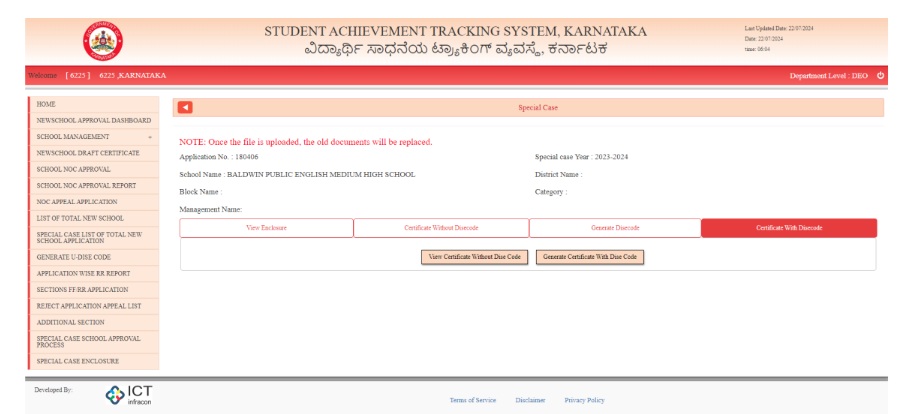
3. After clicking on ‘View,’ the option to review the previous enclosures will be available under ‘View Enclosure.’ To update or upload all required documents, click on the ‘Update Enclosure’ tab. Once the necessary documents are uploaded, click the ‘Submit’ button at the bottom. Note : Once the document is uploaded and submitted the old documents will be removed and new documents will be replaced so be caution while uploading
4. After submitting the enclosures, the option to generate the certificate will become available. In the DDPI/ACPI login, the user needs to update the certificate details. If the application pertains to the upgradation of a school, there is no need to generate a DISE code. Otherwise, click on ‘Generate DISE Code,’ complete the form, and submit it
5. If the school is being upgraded, update the existing school’s DISE code and submit it. After submitting the DISE code, you will be able to generate the final DSC certificate.”
6. If this is not an upgraded school, fill out the form provided below and submit it. The MHRD will then generate the DISE code. Once the DISE code is provided, you will be able to generate the final DSC certificate.
7. Once the DISE code is generated, the final certificate can be viewed and generated.
Note:
1. After issuing the certificate, the DDPI must ensure that the school is provided access to the SATS system for student enrolment and school profile management. If this is not completed, the school will not be enabled, and appropriate action will be taken against the DDPI.
2. The documents uploaded by the DDPI will also be visible for the FR. It is the responsibility of the DDPI to verify the validity of the documents before uploading them