uattnpfts.tn.gov.in : Tamil Nadu Public Fund Tracking System (TNPFTS)
Organisation : Government of Tamil Nadu
Facility Name : Tamil Nadu Public Fund Tracking System (TNPFTS)
Applicable States/UTs : Tamil Nadu
Website : https://www.uattnpfts.tn.gov.in/fmw-login-ui/#/login
| Want to ask a question / comment on this post? Go to bottom of this page. |
|---|
What is Tamil Nadu Public Fund Tracking System?
Tamil Nadu Public Fund Tracking System is a dedicated financially integrated portal to undertake expenditures out of Scheme accounts by the user departments. The system is linked with State Treasury to track funds to end beneficiaries by means of dedicated reporting system.
Related / Similar Facility : TNCGAP Compassionate Grounds Appointment Tamil Nadu

Advantages of Tamil Nadu Public Fund Tracking System
** Complete tracking of funds from the treasury to the end user.
** Real Time transactions and MIS availability is easy.
** No money can be kept idle in many accounts and the SNA accounts will be used judiciously.
** Annual reconciliation of accounts is easy.
** 100% digital transaction will be ensured.
** Due to effective vendor validation through NPCI/NSDL ghost beneficiaries will be eliminated.
** Decision making will be easy based on the expenditure pattern analysis.
** No postdated entry is captured and accounted for in real time.
** Interest calculation and savings and other utility payments will be done easily.
** The software will be available in Bilingual ie. Tamil and English Language.
How To Login To Tamil Nadu Public Fund Tracking System?
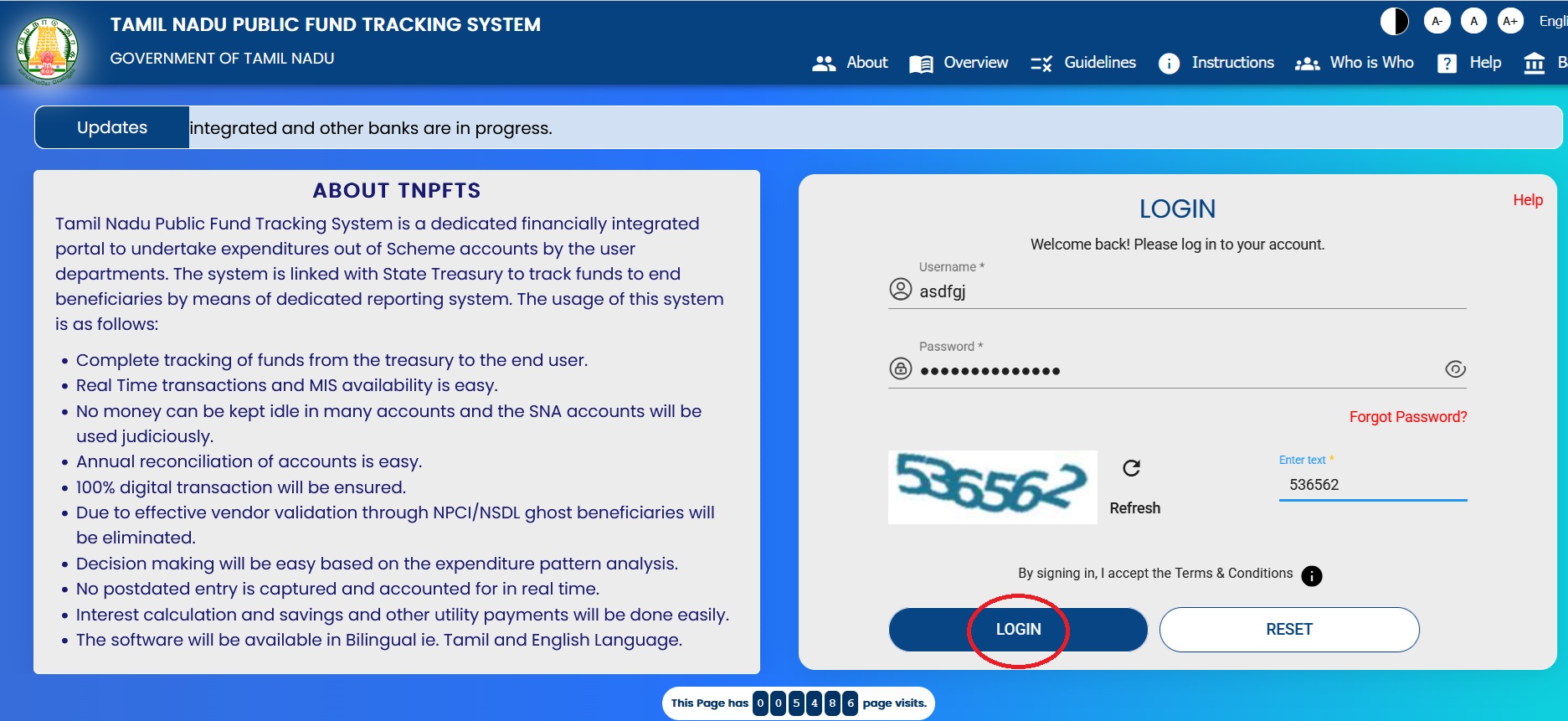
To login to Tamil Nadu Public Fund Tracking System, Follow the below steps
Steps:
** Visit the website of Tamil Nadu Public Fund Tracking System (TNPFTS)
** Please fill in the fields titled ‘Username’ and ‘Password’.
** Enter the 6-digit CAPTCHA code displayed in the box.
** Click the ‘LOGIN’ button to proceed.
Components of TNPFTS
The Tamil Nadu Public Fund Tracking System is designed in such a way that the following components are integrated with in the system.
** Banking Integration
** Head of Account Mapping
** Scheme configuration
** Components Mapping
** User Management
** Vendor/ Beneficiary Management
** REAT operation
** Report Management
Banking Integration:
The Public Fund Tracking System is integrated with the majority of scheduled commercial banks to ensure easy access to the payment system. The payment files will be transferred to the banking site through a secured protocol and the response on the file is also captured by the TNPFTS. Each Scheme should have a separate State Nodal Bank Account to operate the scheme down the hierarchy. There is no need to open a separate bank accounts down the line at the various levels.
Head of Account Mapping:
Any fund or grant that is drawn out of the Treasury is mapped with a certain Head of Accounts. The schemes that are being implemented at the field level may be linked with either one or many Head of Accounts. The TNPFTS is designed in such a way that every scheme can be mapped with either one or multiple HoAs. This task will be undertaken by the concerned Head of the Department. The Budgetary Head of Account of all schemes are configured with the schemes, and they are mapped with the TNPFTS Portal for concurrent monitoring of the scheme progress and the timely intervention of the Government in releasing funds and others.
Scheme configuration:
The Schemes of various department coded and enrolled in the PFTS portal. The users can handle the portal at ease and the payment will be made to the vendors on a timely manner without any manual interference The scheme configuration done with the total amount allocated for the scheme, amount released, expenditure made and the balance amount available in the account and performance of the implementing agencies down the line will be available in this portal.
Components Mapping:
The scheme components have been enlisted in the portal and the component-wise expenditure pattern can also be easily monitored by this portal. The Heads of the Department can configure the components for implementing agencies under its control.