General Hospital Ernakulam Doctors Appointment Booking : generalhospitalernakulam.in
Organisation : General Hospital Ernakulam
Facility Name : Doctors Appointment Booking
Hospital Location : Ernakulam
Website : https://generalhospitalernakulam.in/patient-registration-advance-booking/#
| Want to ask a question / comment on this post? Go to bottom of this page. |
|---|
How To Book General Hospital Ernakulam Doctors Appointment?
Four counters are available for OP Registration
Related / Similar Facility : Dr. Mehta’s Hospitals Chennai Doctors Appointment Booking
** Super Specialty Block –>Ground Floor –>Reception Counter
** Old OP Block –>Ground Floor –>OP Counter
** OP Counter –>Ground Floor –>Administrative office (Only for staff and Physiotherapy Patients)
** Cancer Block –> Reception counter –>Only for Oncology patients

Registration Time: 7.30 am – 01.00 pm (Two counter from 5.00 AM at OP Block)
Evening O.P (General O.P Only ) : 1.00 pm – 6.00 pm
Guidelines For OP Registration
** The patients need to take OP ticket from any of the OP reception counters. New patients needs to take new OP ticket from the OP counter
** The registration counter staff will enter the details provided by the patient which includes Mobile number, Patient Name, Age, Gender etc.
** A new OP ticket with a UHID number will be generated from eHealth software.
** The patient needs to pay Rs.5/- for new OP ticket
** The Revisit patients with OP ticket in hand needs to take visit date’s token number from the reception counter , seal and token number with date will be marked in the OP ticket.
** When the registration process is completed, the patient waits in front of the concerned OP room for his token number to be displayed on token display.
** For any corrections/updations in the Name, Age , Sex, Address etc in the OP/IP slip please visit Medical Records Department located in the first floor of Administrative Office.
Guidelines For Advance Booking
** After completing consultation it is now possible to take advance appointment from hospital for the next visit.
** Visit reception counter and show your OP ticket and tell them the next appointment date
** Depending upon the availability of token, advance OP ticket will be get from reception counter
** Visit on the appointment taken date in the OP directly without waiting in the long queue.
Guidelines For Online Booking
** UHID number is Unique Hospital Identification Number and it can be temporary or permanent.
** Temporary UHID starts with ‘T’ and Permanent UHID shall begin with hospital code and not with ‘T’.
** For Permanent UHID registration Aadhaar card or Aadhaar number with aadhaar linked mobile is mandatory.
** It is possible to take permanent UHID number and UHID card from the hospital itself.
** One benefit of Permanent UHID card is patient can take online appointment directly from home itself.
Steps For Taking Online Appointment
Open the website https://ehealth.kerala.gov.in. If you don’t have a permanent UHID you can follow the below given Steps for registering with eHealth. Click Register
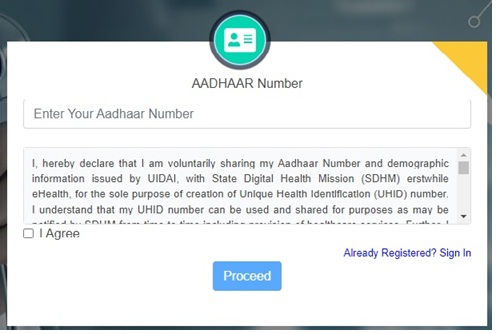
** Type Aadhaar Number
** Click I agree —>proceed
** You will get an OTP in the aadhaar linked Mobile,Type OTP and click verify.
** You will get a new 16 digit Permanent UHID number and password will get in SMS.
** You can use this UHID number and password for booking appointment online.
How to take online appointment?
** Login with your User name and Password
** Click on New Appointment and click Proceed
** Select the department from the Drop Down List and Click Proceed
** Select Date,give income and Click Check Availability
** While you select date available token will display in the screen.
** Select required token and Click Book Appointment
** You will also get an SMS with booking details
What to do if you Forgot Password?
Go to Home Page/ www.ehealth.kerala.gov.in
** Type UHID Click “forgot”
** Type UHID, Aadhaar, Mobile No
** Click Reset password
** You will receive an SMS from ehealth containing password.
** You can now create a new password using the password received via SMS
Password Policy:
Create new password(must include one Uppercase letter (A,B,C…) , one digit (1,2,3…) and one special character (@,#,$….). Print out of the OP ticket will be available from hospital.