How To Apply For Court Case PPB in Telangana?
Organisation : Telangana Revenue Department
Facility Name : Application For Court Case PPB
Applicable States/UTs : Telangana
Website : https://bhubharati.telangana.gov.in/homePage
| Want to ask a question / comment on this post? Go to bottom of this page. |
|---|
How To Apply For Court Case PPB in Telangana?
To file an Application for Court Case PPB (Pattadar Passbook) in Telangana, visit the Bhu Bharati portal. Navigate to “Mutation” > “Application for PPB Court Cases,” enter land details, upload the court order, and pay the fee. This process handles mutation requests based on judicial orders, which are then verified by department officials.
Related / Similar Facility : How To Apply For Registration of DAGPA in Telangana?

Login
1) Visit Bhu Bharati (https://bhubharati.telangana.gov.in/) portal and click on the Login button to avail any service.
2) If not registered with Bhu Bharati, click on the Signup to register into the portal (check user registration manual if required).
3) If already registered with Bhu Bharati, login to the portal by entering the mobile number, password, captcha, and click on the Get OTP button.
4) OTP has been successfully sent to the registered mobile number. Click on the OK button.
5) Enter OTP and click on the Validate OTP button.
6) OTP has been verified successfully. Click on the OTP button.
7) Citizen Dashboard is now open for using any service.
Application For Court Case PPB
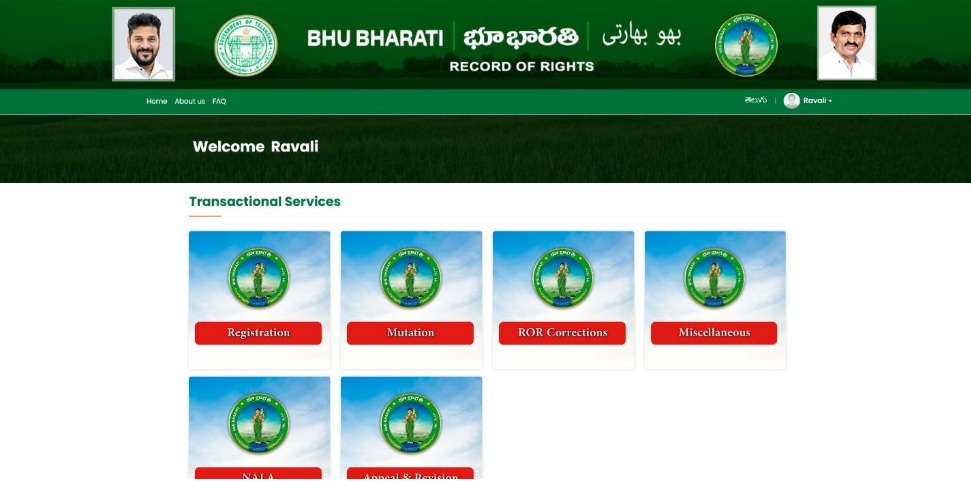
1. To avail the Application for Court Case PPB service, hover over Mutation and click on it.
2. Choose Application for PPB Court Cases and other mutations.
3. You can check all the citizen side flows involved in the application and click on the Proceed button to move further into the application.
4. Click on new request button
5. Select District, Mandal, Village, Survey no and Khata no and click on the fetch button.
6. Land details are populated. Check the checkbox corresponding to the extent of land to be claimed and enter the claimed extent.
7. Enter Court details.
8. Select applicant type (Individual/organization), whether pattadar is deceased or not, whether you have PPB or not. If Yes, enter passbook number and click on the Fetch button. The primary details will be auto populated. If No, enter the details.
9. Enter communication address details and upload court order and submit.
10. A pop-up appears asking for confirmation to proceed. Click on the OK button.
11. Application is successfully submitted and application number is generated. Click on the OK button to proceed for payment.
Payment
12. The amount to be paid is displayed. Click on the Make Payment button.
13. Check the checkbox for accepting terms and conditions and click on the Proceed button.
14. You will be redirected to the payment gateway. After successful payment, under Application for PPB- Court Case dashboard, click on the Proceed for Submission button.
15. The application is forwarded to Tahsildar for further processing (Notice Generation).
Slot Booking
16. After Approval from RDO, the citizen has to book slot for performing eKYC. Go to the Application for PPB – Court Case Dashboard. Click on the Book Slot button.
17. Select slot date, time and click on the Submit button.
18. Application is successfully submitted to the Tahsildar for further processing.