Telangana Grievance Relating to Inclusion in Prohibited Properties List
Organisation : Telangana Revenue Department
Facility Name : Grievance Relating to Inclusion in Prohibited Properties List
Applicable States/UTs : Telangana
Website : https://bhubharati.telangana.gov.in/homePage
| Want to ask a question / comment on this post? Go to bottom of this page. |
|---|
How To Avail Grievance Relating to Inclusion in Prohibited Properties List?
If your property is listed under the “Prohibited Properties” list (often referred to as Section 22-A land) in Telangana, you can file a formal Grievance Relating to Inclusion in Prohibited Properties List to have it reviewed and potentially removed. This process is primarily managed through the Bhu Bharati portal (formerly part of Dharani) and involves the TM15 module.
Related / Similar Facility : How To Apply For Passbook Data Correction in Telangana?

Login
1) Visit Bhu Bharati (https://bhubharati.telangana.gov.in/) portal and click on the Login button to avail any service.
2) If not registered with Bhu Bharati, click on the Signup to register into the portal (check user registration manual if required).
3) If already registered with Bhu Bharati, login to the portal by entering the mobile number, password, captcha, and click on the Get OTP button.
4) OTP has been successfully sent to the registered mobile number. Click on the OK button.
5) Enter OTP and click on the Validate OTP button.
6) OTP has been verified successfully. Click on the OTP button.
7) Citizen Dashboard is now open for using any service.
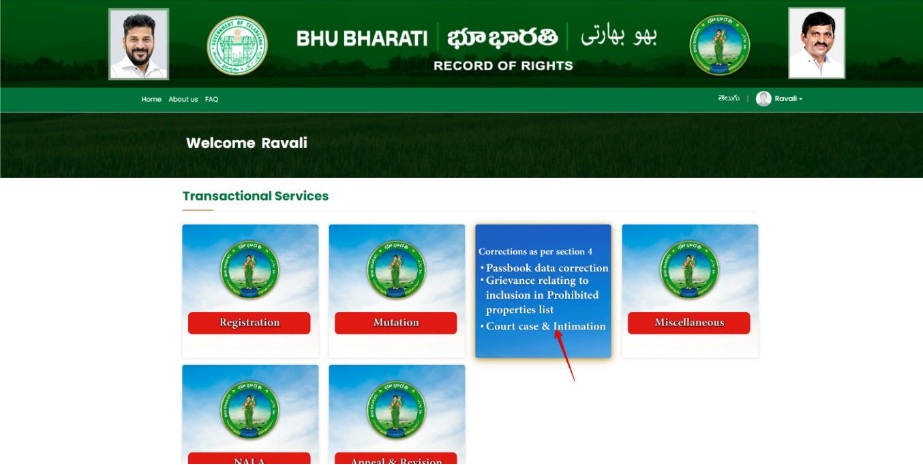
Grievance Relating to Inclusion in Prohibited Properties List
1. To avail the Grievance relating to inclusion in prohibited properties list service, hover over ROR Corrections and click on it.
2. Choose Grievance relating to inclusion in prohibited properties list.
3. You can check all the citizen side flows involved in the application and click on the Proceed button to move further into the application.
4. Information related to the module populates. Click on click here to continue button.
5. Please select if do you have passbook no or not? If Yes is selected, enter PPB no. and click on Fetch button.
6. If No is selected, enter the required details and click on the Fetch button.
7. Enter Aadhaar number. Check the checkbox of the survey number for which grievance is to be filed and enter reason why be allowed. Click on the Continue button.
8. Enter Yes/NO under Do you want to remove Survey no. from CARD prohibited list. Also, the reason why it is to be removed from prohibited list.
9. Enter communication details and document details and upload required documents and click on Submit button.
10. A pop-up appears asking for confirmation to proceed. Click on the OK button.
11. Application is successfully submitted and application number is generated. Now. The application is pending for eKYC at Meeseva. Click on the OK button.