How To Apply For Khata Merging in Telangana?
Organisation : Telangana Revenue Department
Facility Name : Application For Khata Merging
Applicable States/UTs : Telangana
Website : https://bhubharati.telangana.gov.in/homePage
| Want to ask a question / comment on this post? Go to bottom of this page. |
|---|
How To Apply For Khata Merging in Telangana?
Khata Merging in Telangana (TM32) is the process of consolidating multiple land records (Khatas/Passbooks) into a single account under one owner, now primarily handled through the Bhu Bharati portal (formerly Dharani). Property owners can apply online, select Passbook numbers, verify details via Aadhar, and pay fees to consolidate their agricultural land holdings.
Related / Similar Facility : Bhu Bharati Telangana Registration of Exchange

Login
1) Visit Bhu Bharati (https://bhubharati.telangana.gov.in/) portal and click on the Login button to avail any service.
2) If not registered with Bhu Bharati, click on the Signup to register into the portal (check user registration manual if required).
3) If already registered with Bhu Bharati, login to the portal by entering the mobile number, password, captcha, and click on the Get OTP button.
4) OTP has been successfully sent to the registered mobile number. Click on the OK button.
5) Enter OTP and click on the Validate OTP button.
6) OTP has been verified successfully. Click on the OTP button.
7) Citizen Dashboard is now open for using any service.
Application For Khata Merging
1. Go to Applications.
2. Click on Application for Khata merging.
3. Module process flow will be displayed click on proceed.
4. Click on new request.
5. Select District, Mandal, Village. In dropdown search by Aadhar no. & CIN no. will be available. If you want to search by Aadhar no. select Aadhaar no. from dropdown and click on fetch button.
6. If you want to search by CIN no. select CIN no from dropdown and click on fetch button.
7. Select Passbook nos. you want to merge khatas and click on proceed for khata merging.
8. Enter communication details. Select for merging khata nos. and enter remarks. Click on Merge khata.
Payment
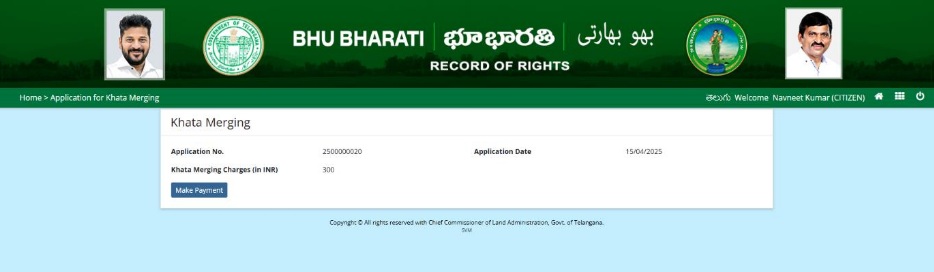
9. The amount to be paid is displayed. Click on the Make Payment button.
10.Check the checkbox for accepting terms and conditions and click on the Proceed button.
11.Application is be forwarded to department for further processing.
FAQ On Khata
Frequently Asked Questions FAQ On Khata
Is Khata merging module applicable for Organisation PPB?
Yes, for Organization PPB also khata merging module is applicable but it is available only with CIN number in module.
Pattadar name recorded wrongly in Bhubharati, how to get the name of Pattadar corrected in Bhubharati?
Pattadar shall apply in Modification Request Application module under Change of name option for Spelling correction in name including Surname and Complete Name Change etc.,
Land Nature / Land Classification / Manner in which land acquired/ Land type are wrongly recorded in Bhubharati, how to get it corrected in Bhubharati?
Pattadar shall apply in Modification Request Application module under Change of Land Nature / Change of Land Classification / Change of Manner in which land acquired/ Change of Land type.
Land Nature is patta, but transaction status is showing as “Marked as assigned land”. How to get it removed from assigned to patta land in Bhubharati?
The citizen has to apply in (Modification Request Application) under Change of Land Nature / Change of Land Classification / Change of Manner in which land acquired/ Change of Land type option for correction.